
Tags: Slack, Ways of Working Pillar: remote Startup Tips Tools Tricks
Expectations#
- You don’t have to read everything — only read posts where you or your team are directly mentioned, your team channel, and the company-must-reads channels
- You should respond within 4 hours when directly mentioned (within working hours)
- Keep others updated (by replying or an emoji) if you won’t be able to respond within the defined response time (4 hours)
- Always use a thread when answering a post
- Always mention someone when you expect an answer from them
- If you’re mentioned, acknowledge the post with a reply or an emoji
- Never use @here or @channel; mention a person or a team (Slack group) instead
- Always post publicly (avoid direct/group messages) unless it’s confidential
- You’re free to leave a thread (one can only leave a channel or — if it’s generally relevant — mute it)
Remember, Slack isn’t synchronous communication by default, so you shouldn’t expect an immediate response.
Slack isn’t documentation. All outcomes and decisions from discussions on Slack should be written into your documentation space.
Channel usage#
Slack wants you to use channels for categorization.
You can join or remove yourself from any optional channel at any time.
If a new topic doesn’t fit into the current channels, you can create a new channel based on the channel naming below. Remember to give a channel topic and description.
Mandatory channels to join#
Examples
The following channels are mandatory for everyone:
#company-general-must_reads#company_[your region]-must_reads#company-general-convers#team-<your-home-team>-internal
All other channels are optional. We recommend being a member of many channels (so that you can be reached easily using @... mentions) but set up the notifications so that you’re not distracted by the noise.
Acknowledgment, info only, circulate#
You can help others to quickly get the proper context (and, in some cases: call to action) of a message by adding a leading emoji:

You might see a message that starts with or includes an :ack: emoji. In this case, it’s essential to read the message and respond by using the :ack: emoji. You can also give feedback if you want to.

For your information. No action required

Spread the news.

Internal information, don’t distribute.

Discussion. This is something you’d like to discuss. Comments in the thread are welcome.

Question. Ideally, give some alternatives as answers. Make use of reaction emojis like 1️⃣ first alternative and 2️⃣ second alternative
Channel prefix#
| Prefix | Usage |
|---|---|
| company | for all company-wide channels |
| dept | for all department-wide information |
| team | for all team channels (where applicable, the team name should get the short name of the department as a prefix) |
| guild | for all static groups of people who aren’t a team |
| customer | customer-related channel |
| partner | partner-related channel |
| project | temporary channel for dedicated projects |
| ask | channel that offers any kind of help |
| issues | issues are automatically published to this kind of channel |
| info | other kinds of information are (automatically) published to this channel |
| social | social activity or exchange |
| test | channels for testing |
Multiproduct#
if a channel is created to our product portfolio, make clear if it’s related to all products or a specific one (this can be applicable for teams in support or professional services, too).
| prod-all | if applicable for all products |
|---|---|
| prod_coco | Composable Commerce related channel |
| prod_ft | Frontend related channel |
Region#
if a channel is related to a region, add it in a standardized format:
| apac | |
|---|---|
| emea | |
| americas | |
| … |
Channel suffix#
| Suffix | Usage |
|---|---|
| internal | to indicated that a channel is for team internal discussions only |
| chat | to indicate that this channel is more to “just” chat |
| shared | all channels shared with external should get the prefix shared |
| convers | for example, teams could have a dedicated channel for conversation with people outside of their team |
Department abbreviation#
As a prefix where needed, if possible, **use the full name
Examples**
| Department/Group | Abbreviation |
|---|---|
| C-Level | c_lev |
| Leadership | leader |
| Research & Development | r_n_d |
| (Professional) Services | ps |
| Sales | sales |
| Marketing | mktg |
| People & Organization | p_n_o |
| Corporate Services | cs |
| Support, Doc & Training | sdnt |
Profile setting#
Display name: Your <First name> or <Nickname> only. Starting with a capital letter.
If you work part-time, include the days you work, for example, Catherine [Mon-Wed].
This should also be updated when you’re on holiday to <First name> [back DD Mon] .
To make communication across time zones easier and to handle expectations, add your general working hours in short (just a wide guess) in UTC: Catherine [Mon-Wed, 7-17 UTC] It doesn’t matter if you’re taking breaks in between or similar, it should just give other people a rough feeling when they could expect an answer from you.
Photo: please use a photo of your face that makes it easy to recognize you and distinguish you from others.
Full name: Your <First name> <Last name>.
What I do: Your role title at commercetools.
Pronouns: Your preferred pronouns.
Phone number: Your mobile phone number if you need to be called.
Time zone: Select the time zone you’re currently in.
My Working Hours: The hours you usually (or prefer) to work. Use a 24-hour clock and UTC.
GitHub profile: Your GitHub profile name if you have one.
Status settings#
Updating status settings page
Always keep your status up-to-date so others can easily see if you’re available or not.

Use here anytime you’re available

Use brb (be right back) for when you’re away for an hour or more (you can adjust the time it’s visible)

Use away when you leave for the day

Use focus when you’re in focus mode and won’t respond to messages for a while
You can use any other emoji for other statuses as long as the status description clearly explains what it means.
User groups#
Everyone should belong to at least 1 user group, your home team. A group can then be mentioned in any message on any channel. Always use a user group rather than @channel or @here.
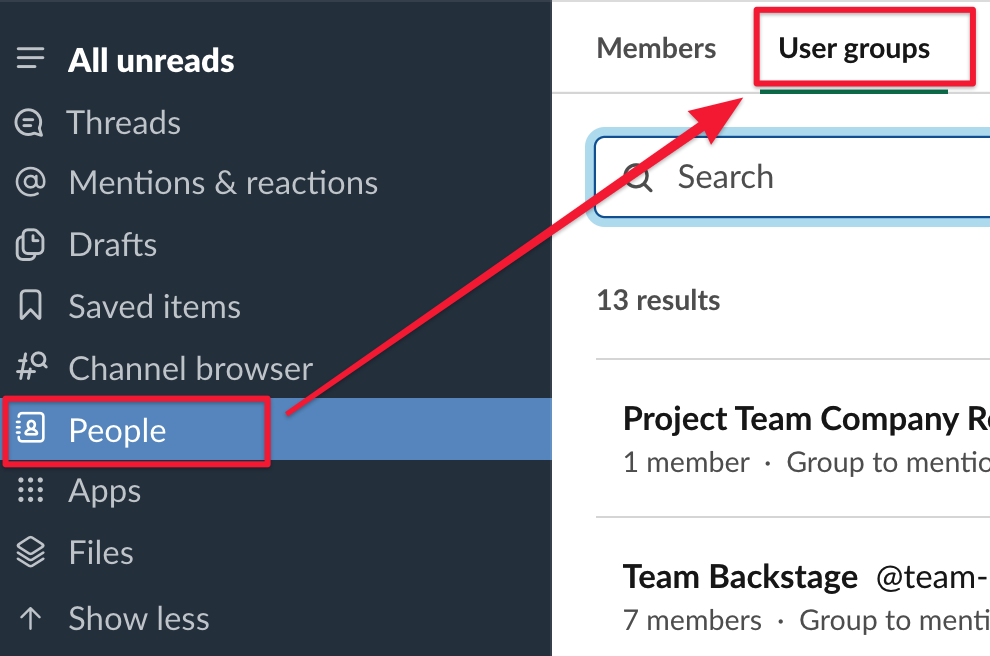
You can find a list of the user groups under People and then User groups. You can add yourself to any user group you want to.
Group names should follow the same conventions as channel names